Architecture
Each appliance consists of 4 modules deployed in Tomcat containers as separate WAR files. For production systems, it is recommended that each module be deployed in a separate Tomcat instance (thus yielding four Tomcat processes). A sample storage configuration is outlined below where we’d use
Ramdisk for the short term store - in this storage stage, we’d store data at a granularity of an hour.
SSD/SAS drives for the medium term store - in this storage stage, we’d store data at a granularity of a day.
A NAS/SAN for the long term store - in this storage stage, we’d store data at a granularity of a year.
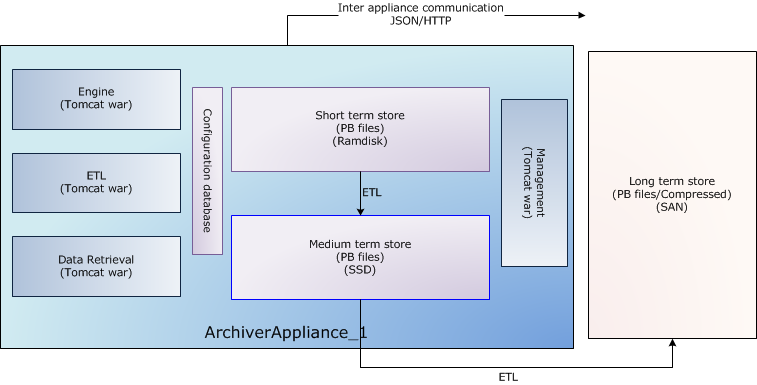
A wide variety of such configurations is possible and supported. For example, if you have a powerful enough NAS/SAN, you could write straight to the long term store; bypassing all the stages in between.
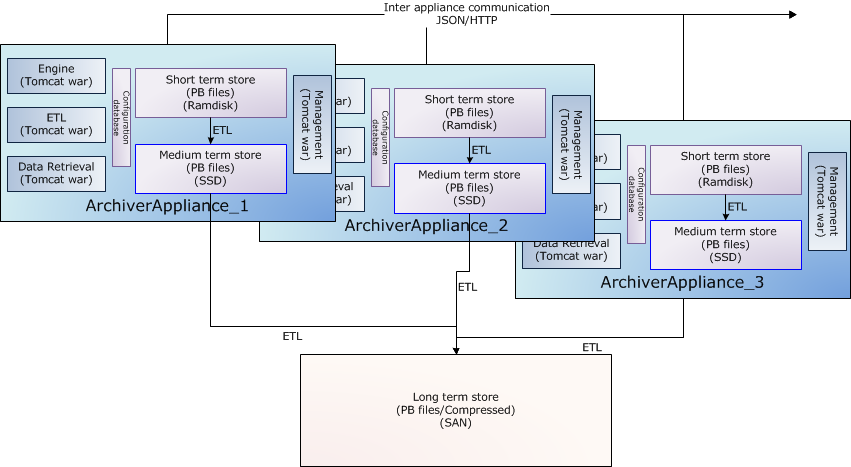
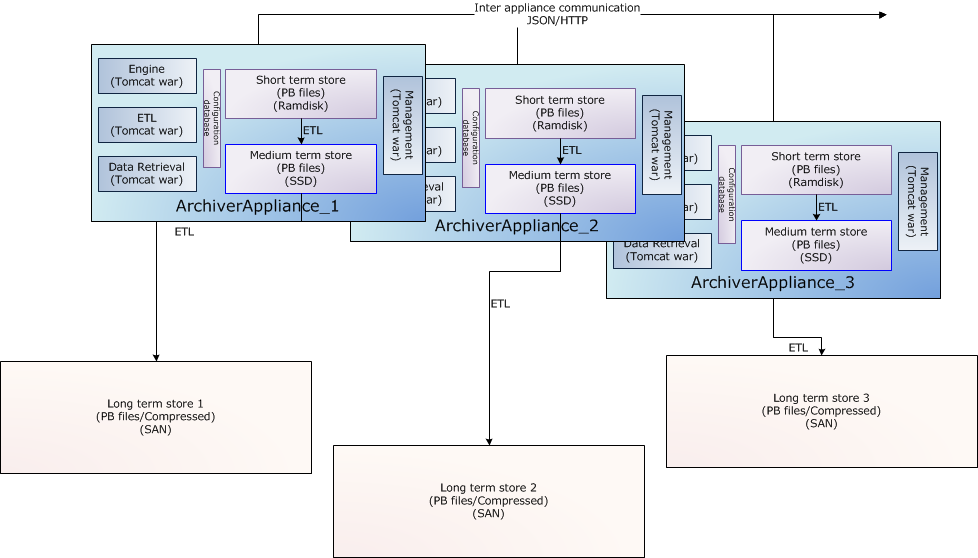
The long term store is shown outside the appliance as an example of a commonly deployed configuration. There is no necessity for the appliances to share any storage; so both of these configurations are possible.
Clustering
While each appliance in a cluster is independent and self-contained, all
members of a cluster are listed in a special configuration file
(typically called appliances.xml)
that is site-specific and identical across all appliances in the
cluster. The appliances.xml is a simple XML file that contains the
ports and URLs of the various webapps in that appliance. Each appliance
has a dedicated TCP/IP endpoint called cluster_inetport for cluster
operations like cluster membership etc… One startup, the mgmt webapp
uses the cluster_inetport of all the appliances in appliances.xml to
discover other members of the cluster. This is done using TCP/IP only
(no need for broadcast/multicast support).
The business processes are all cluster-aware; the bulk of the
inter-appliance communication that happens as part of normal operation
is accomplished using JSON/HTTP on the other URLs defined in
appliances.xml. All the JSON/HTTP calls from the mgmt webapp are also
available to you for use in
scripting.
The archiving functionality is split across members of the cluster; that is, each PV that is being archived is being archived by one appliance in the cluster. However, both data retrieval and business requests can be dispatched to any random appliance in the cluster; the appliance has the functionality to route/proxy the request accordingly.
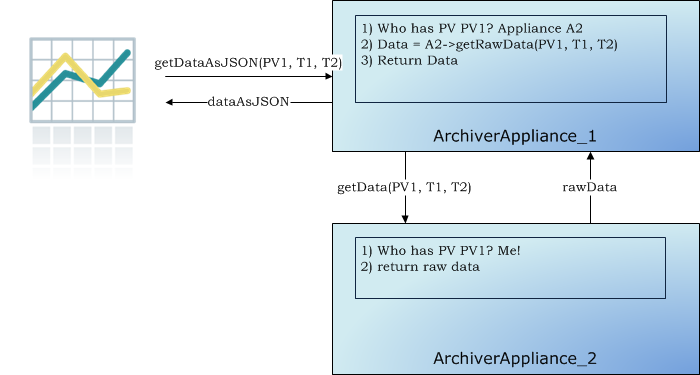
In addition, users do not need to allocate PVs to appliances when requesting for new PVs be archived. The appliances maintain a small set of metrics during their operation and use this in addition to the measured event and storage rates to do an automated Capacity Planning / load balancing.
Information useful to developers
If you are unfamiliar with servlet containers; here’s a small overview that a few collaborators found useful
Reading up on a few basics will help; there are several good sources of information on the net; but don’t get bogged down by the details.
Please do use Eclipse/Netbeans/IntelliJ to navigate the code. This makes life so much easier.
To get a quick sense of what a class/interface does, you can use the javadoc. Some attempts have been made to have some Javadoc in most classes and all interfaces
We use Tomcat purely as a servlet container; that is, a quick way of servicing HTTP requests using Java code.
A WAR file is basically a ZIP file (you can use unzip) with some conventions. For example, all the libraries (.jar’s) that the application depends on will be located in the
WEB-INF/libfolder.The starting point for servlets in a WAR file is the file
WEB-INF/web.xml. For example, in the mgmt.war’sWEB-INF/web.xml, you can see that all HTTP requests matching the pattern/bpl/*are satisfied using the Java classorg.epics.archiverappliance.mgmt.BPLServlet.If you navigate to this class in Eclipse, you’ll see that it is basically a registry of BPLActions.
For example, the HTTP request,
/mgmt/bpl/getAllPVsis satisfied using theGetAllPVsclass. Breaking this down,/mgmtgets you into the mgmt.war file./bplgets you into the BPLServlet class./getAllPVsgets you into the GetAllPVs class.
From a very high level
The engine.war establishes Channel Access monitors and then writes the data into the short term store (STS).
The etl.war file moves data between stores - that is from the STS to the MTS and from the MTS to the LTS and so on.
The retrieval.war gathers data from all the stores, stitches them together to satisfy data retrieval requests.
The mgmt.war manages all the other three and holds configuration state.
In terms of configuration, the most important is the
PVTypeInfo; you can see what one looks like by looking athttp://machine:17665/mgmt/bpl/getPVTypeInfo?pv=MYPV:111:BDESThe main interfaces are the ones in the
org.epics.archiverappliancepackage.The ConfigService class does all configuration management.
The customization guide is also a good guide to the way in which this product can be customized.
ConfigService
All of the configuration in the archiver appliance is handled thru implementations of the ConfigService interface. Each webapp has one instance of this interface and this instance is dependency injected into the classes that need it. If all else fails, you can create your implementation of the ConfigService and register it in the servlet context listener.