Details
This is an implementation of an archiver for EPICS control systems that aims to archive millions of PVs.
Here are the main features.
Ability to cluster appliances and to scale by adding appliances to the cluster.
Limited support for redundancy.
Ability to dynamically re-assign PVs to appliances.
Multiple stages and an inbuilt process to move data between the stages.
This supports the ability to use faster storage (which is perhaps limited in size) to improve performance.
Ability to reduce (decimate) the data as it moves into a store.
Focus on data retrieval performance.
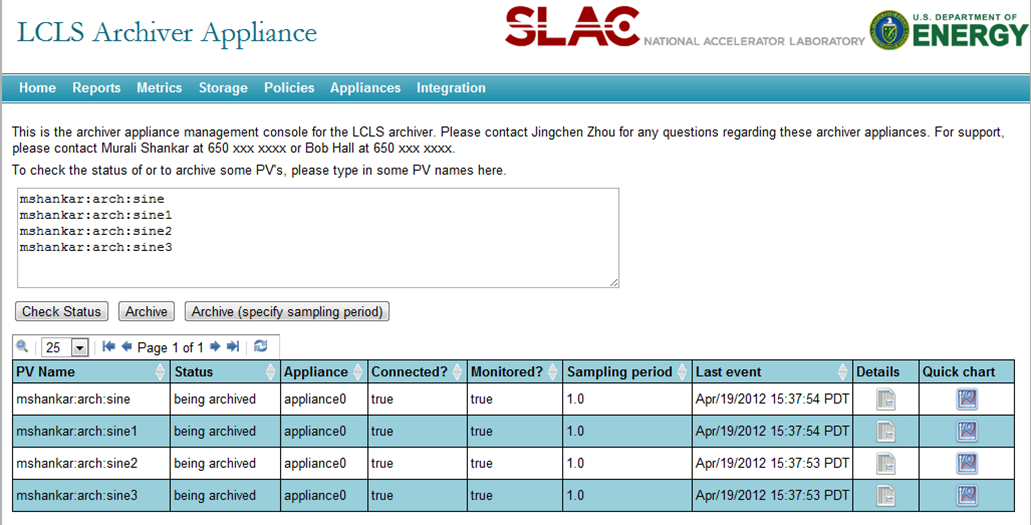
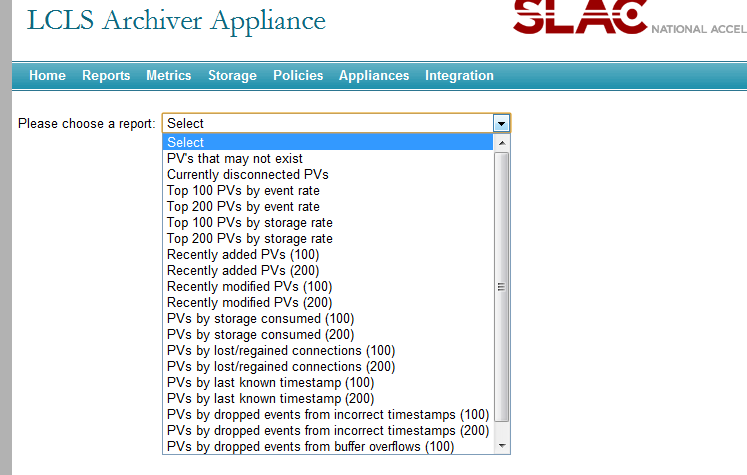
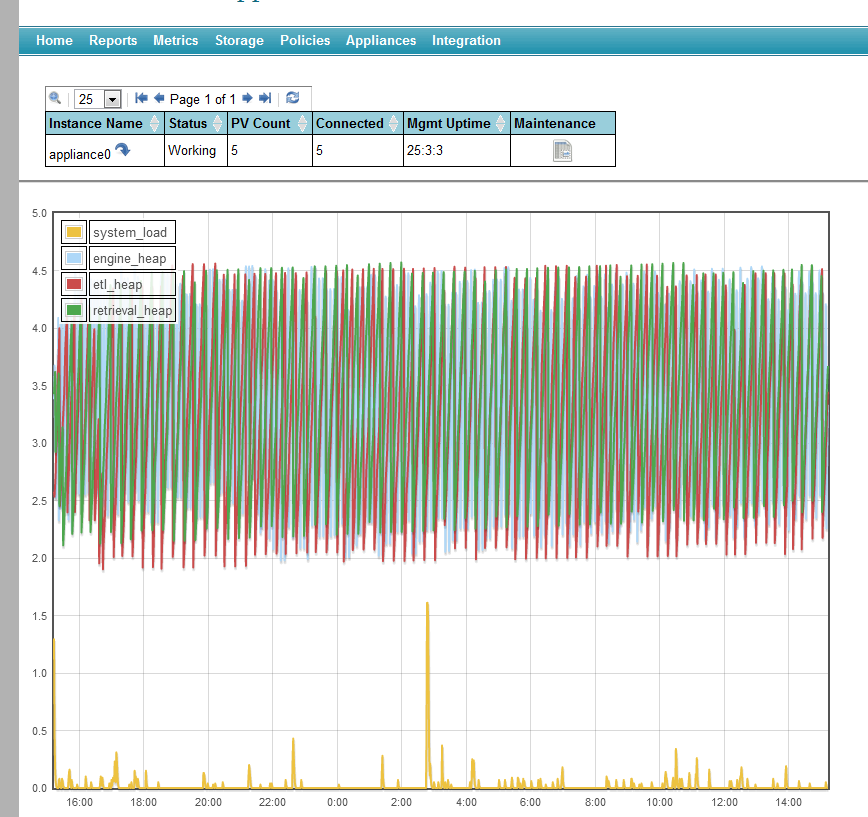
A management interface giving you the ability to manage and monitor the system using a browser. This includes
The ability to add PVs to a cluster of appliances using a browser (perhaps by users).
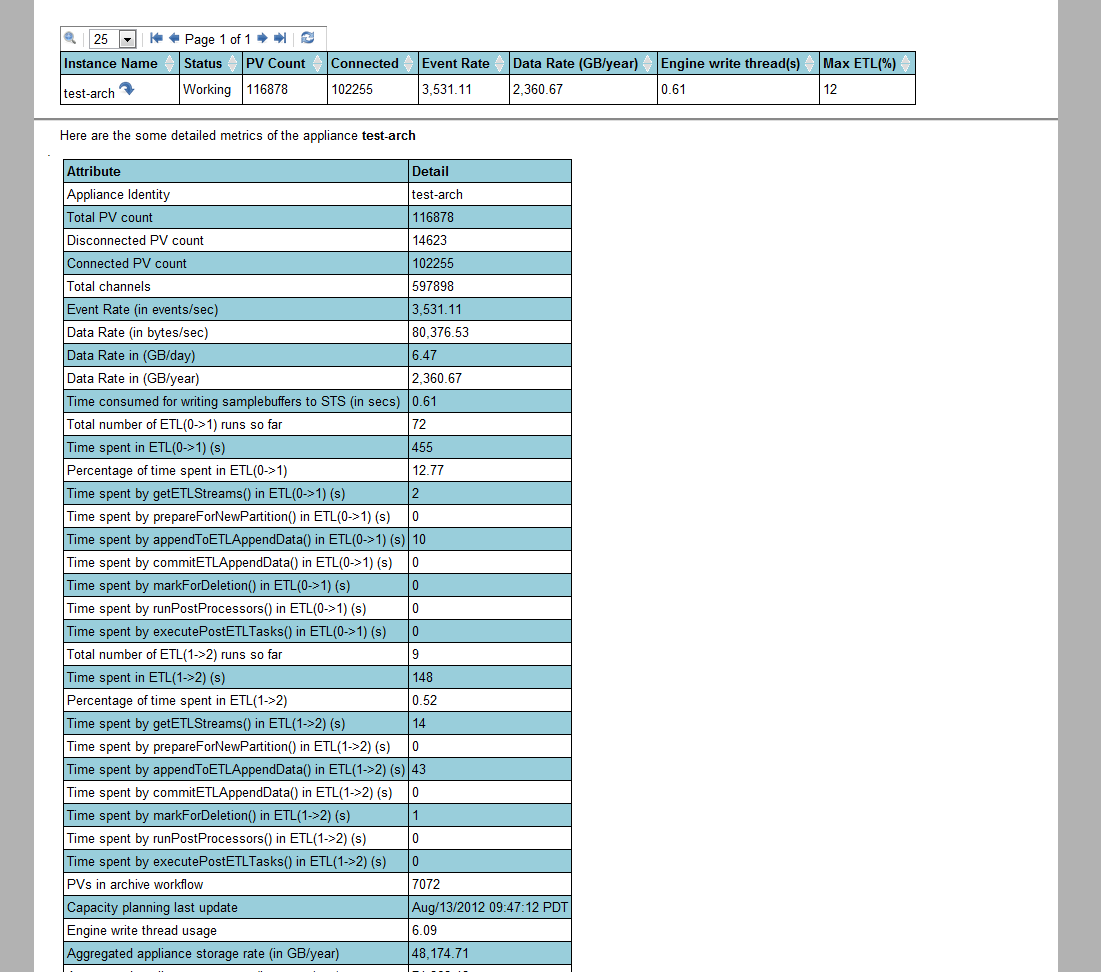
Various metrics to help with capacity planning.
Ability to define system-wide defaults for archiving parameters using policies.
Ability to script the business processes in the appliances using an external process in a language like Python.
Ability to configure various archiving parameters on a per PV basis.
Ability to customize the appliance to suit a different set of requirements. This includes
The ability to use alternate storage technologies that may better suit your needs or perform better in your environment.
The ability to define your own data reduction algorithms and to optionally cache data generated by these algorithms on a per PV basis.
Simple ways to add support for new MIME types in data retrieval responses.
Support for EPICS aliases.
Support for EPICS 7/PVAccess/Structured data.
Support for retrieval of data using CS-Studio, the ArchiveViewer and Matlab.
Limited integration with existing Channel Archiver data sources.
System requirements
These are the prerequisites for the EPICS archiver appliance.
A recent version of Linux, definitely 64 bit Linux for production systems. If using RedHat, we should aim for RedHat 6.1.
JDK 1.16+ - definitely the 64 bit version for production systems. We need the JDK, not the JRE.
A recent version of Tomcat 9.x; preferably
apache-tomcat-9.0.20or later.The management UI works best with a recent version of Firefox or Chrome.
By default, the EPICS archiver appliance uses a bundled versions of the Java CA and PVA libraries from EPICS base.
Optionally, we’d need
A recent version of MySQL
mysql-5.1or later if persisting configuration to a database. We hope to add Postgres support soon.
In terms of hardware, for production systems, we’d need a reasonably powerful server box with lots of memory for each appliance. For example, we use 24 core machines with 128GB of memory and 15K SAS drives for medium term storage.
Storage
Out of the box, the following storage technologies/plugins are supported.
- PlainStoragePlugin
This plugin serializes samples using Google’s ProtocolBuffers and stores data in chunks. Each chunk has a well defined key and stores data for one PV for a well defined time duration (for example, a month). Using Java NIO2, one can store each chunk in 1. A file per chunk resulting in a file per PV per time partition. 2. A zip file entry in a
.zipfile per chunk resulting in a.zipfile per PV. 3. This can be extended to use other storage technologies for which a NIO2 provider is available (for example, Amazon S3, a database BLOB per chunk or a key/value pair per chunk in any key/value store).Note
By default, the PlainStoragePlugin maps PV names to keys using a simple algorithm that relies on the presence of a good PV naming convention. To use your own mapping scheme, see the Key Mapping section in the customization guide.
To add support for other storage technologies - see the customization guide for details.
Architecture
Each appliance consists of 4 modules deployed in Tomcat containers as separate WAR files. For production systems, it is recommended that each module be deployed in a separate Tomcat instance (thus yielding four Tomcat processes). A sample storage configuration is outlined below where we’d use
Ramdisk for the short term store - in this storage stage, we’d store data at a granularity of an hour.
SSD/SAS drives for the medium term store - in this storage stage, we’d store data at a granularity of a day.
A NAS/SAN for the long term store - in this storage stage, we’d store data at a granularity of a year.
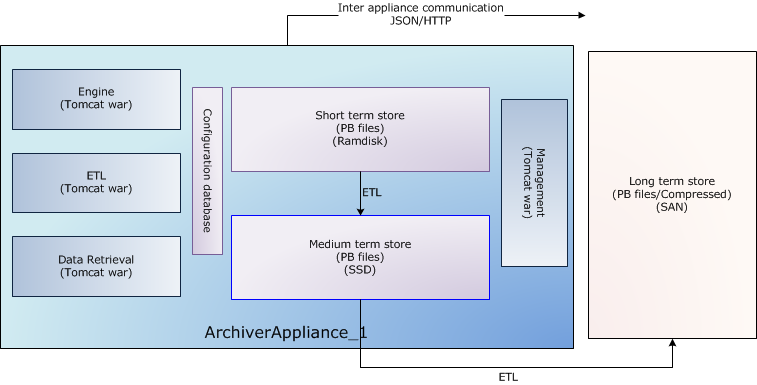
A wide variety of such configurations is possible and supported. For example, if you have a powerful enough NAS/SAN, you could write straight to the long term store; bypassing all the stages in between.
The long term store is shown outside the appliance as an example of a commonly deployed configuration. There is no necessity for the appliances to share any storage; so both of these configurations are possible.
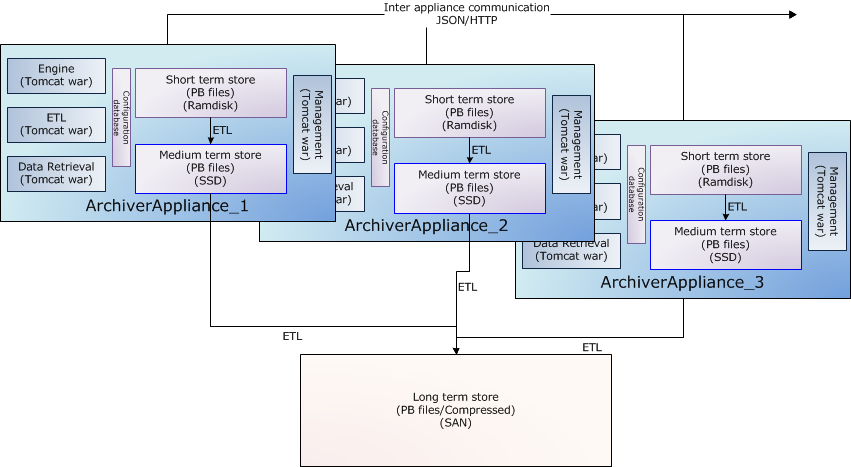
Multiple appliances sending data into one long term store
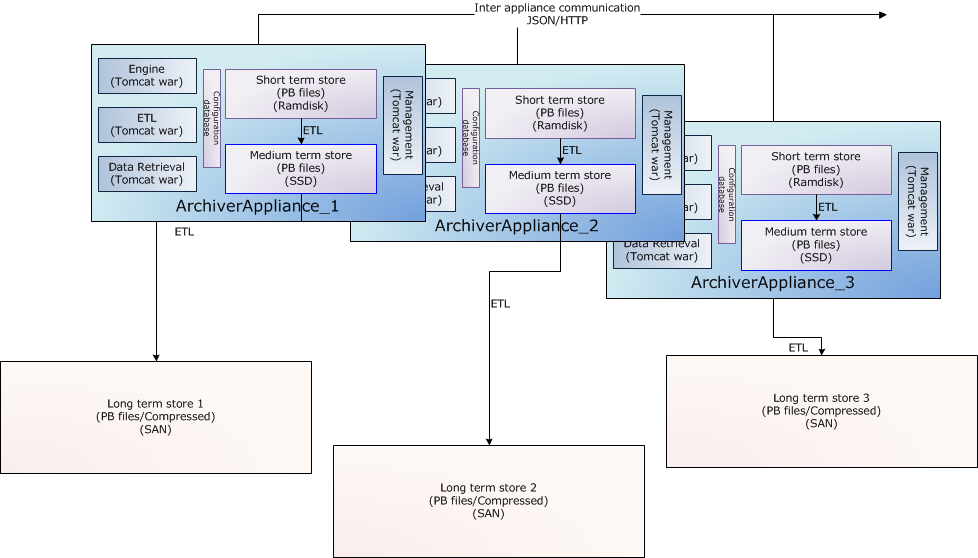
Multiple appliances sending data into different long term stores
Policies
All of the various configurations can get quite tricky for end users to
navigate. Rather than expose all of this variation to the end users and
to provide a simple interface to end users, the archiver appliance uses
policies.
Policies are Python scripts that make these decisions on behalf of the
users. Policies are site-specific and identical across all appliances in
the cluster. When a user requests a new PV to be archived, the archiver
appliance samples the PV to determine event rate, storage rate and other
parameters. In addition, various fields of the PV like .NAME, .ADEL,
.MDEL, .RTYP etc are also obtained. These are passed to the policies
python script which then has some simple code to configure the detailed
archival parameters. The archiver appliance executes the policies.py
python script using an embedded jython
interpreter. Policies allow system administrators to support a wide
variety of configurations that are more appropriate to their
infrastructure without exposing the details to their users.
Clustering
While each appliance in a cluster is independent and self-contained, all
members of a cluster are listed in a special configuration file
(typically called appliances.xml)
that is site-specific and identical across all appliances in the
cluster. The appliances.xml is a simple XML file that contains the
ports and URLs of the various webapps in that appliance. Each appliance
has a dedicated TCP/IP endpoint called cluster_inetport for cluster
operations like cluster membership etc.. One startup, the mgmt webapp
uses the cluster_inetport of all the appliances in appliances.xml to
discover other members of the cluster. This is done using TCP/IP only
(no need for broadcast/multicast support).
The business processes are all cluster-aware; the bulk of the
inter-appliance communication that happens as part of normal operation
is accomplished using JSON/HTTP on the other URLs defined in
appliances.xml. All the JSON/HTTP calls from the mgmt webapp are also
available to you for use in scripting, see the section on
scripting.
The archiving functionality is split across members of the cluster; that is, each PV that is being archived is being archived by one appliance in the cluster. However, both data retrieval and business requests can be dispatched to any random appliance in the cluster; the appliance has the functionality to route/proxy the request accordingly.
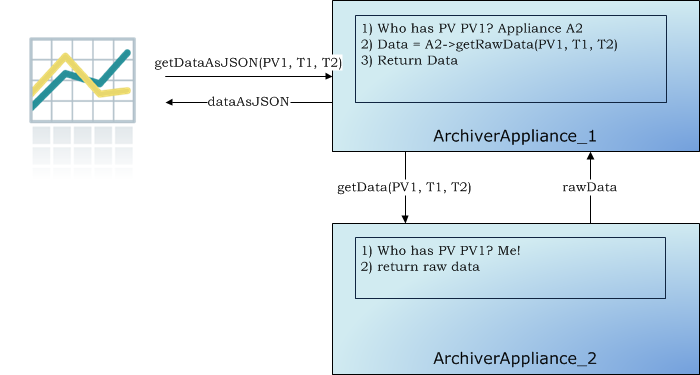
In addition, users do not need to allocate PVs to appliances when requesting for new PVs be archived. The appliances maintain a small set of metrics during their operation and use this in addition to the measured event and storage rates to do an automated Capacity Planning/load balancing.
Scripting
The archiver appliance comes with a web UI that has support for various business processes like adding PV’s to the archivers etc. The web UI communicates with the server principally using JSON/HTTP web service calls. The same web service calls are also available for use from external scripting tools like Python.
#!/usr/bin/env python

import requests

resp = requests.get("http://archappl.slac.stanford.edu/mgmt/bpl/getAllPVs?pv=VPIO:IN20:111:VRA*")
print("\n".join(resp.json()))
Click here for a list of business logic accessible thru scripting.
EPICS 7
The archiver appliance has built in support for EPICS 7 and archiving
PV’s over PVAccess. NTScalars and NTScalarArrays are stored as their
channel access counterparts. For example, PVDouble’s will be stored
as DBR_SCALAR_DOUBLE’s. This makes it possible to use standard
archive viewers to view NTScalars and NTScalarArrays archived thru
PVAccess. Other PVData types are stored as a bunch of bits using
PVAccess serialization. While this is probably not the most efficient,
it does allow for archiving of arbitrary structured data. There is
support for retrieving of structured data using the RAW and JSON
formats.
Screenshots