Install Guide
If you want to simply test the system and quickly get going, please see the Quickstart section.
Customize preexisting VM’s
A simple way to get an installation going is to clone and customize Martin’s repos for your installation. These consist of three repos that are needed to set up the Archiver Appliance environment.
Simply follow the rules in the README of the first repo and the other two repos will be pulled in automatically. The Puppet manifests are found in puppet_module_archiver_appliance.
Site specific installs
Han maintains a set of scripts for site specific installs. This is an excellent starting off point for folks who wish to build their own deployment bundles. This is tested against Debian/CentOS; but should be easily extensible for other distributions.
Using an install script
If you plan to have only one machine in the cluster, you can consider
using the install_scripts/single_machine_install.sh install script
that comes with the installation bundle. This install script
accommodates installations with a “standard” set of parameters and
installs the EPICS archiver appliance on one machine. In addition to the
System requirements, the
install_scripts/single_machine_install.sh will ask for
Location of the Tomcat distribution.
Location of the MySQL client jar - usually a file with a name like
mysql-connector-java-5.1.21-bin.jarA MySQL connection string that looks like so
--user=archappl --password=archappl --database=archapplthat can be used with the MySQL client like somysql ${MYSQL_CONNECTION_STRING} -e "SHOW DATABASES". This implies that the MySQL schema has already been created using something likemysql --user=root --password=***** CREATE DATABASE archappl; GRANT ALL ON archappl.* TO 'archappl' identified by 'archappl';
The install_scripts/single_machine_install.sh install script creates a
couple of scripts in the deployment folder that can be customized for
your site.
sampleStartup.sh- This is a script in the fashion of scripts in/etc/init.dthat can be used to start and stop the four Tomcat processes of your archiver appliance.deployRelease.sh- This can be used to upgrade your installation to a new release of the EPICS archiver appliance. ThedeployRelease.shalso includes some post install hooks to deploy your site specific content as outlined here.
Details
For a finer control over your installation, installation and configuration consists of these steps. For the cluster
Create an appliances.xml
Optionally, create your policies.py file
In addition to installing the JDK, EPICS (see System requirements), for each appliance
Install and configure Tomcat
Compile the Apache Commons Daemon that is supplied with Tomcat.
Install MySQL (or other persistence provider)
Create the tables
Create a connection pool in Tomcat
Set up storage
Create individual Tomcats for each of the WAR files using the provided python script that copies a single Tomcat installation into four individual Tomcats - one for each WAR.
Deploy the WAR files into their respective containers - This is the deployment step that will be run when you upgrade to a new release.
Stop/Start each of the Tomcats
Appliances XML
The appliances.xml is a file that lists all the appliances in a
cluster of archiver appliance. While it is not necessary to point to the
same physical file, the contents are expected to be identical across all
appliances in the cluster. The details of the file are outlined in the
ConfigService
javadoc. A sample appliances.xml with two appliances looks like
<appliances>
   <appliance>
     <identity>appliance0</identity>
     <cluster_inetport>archappl0.slac.stanford.edu:16670</cluster_inetport>
     <mgmt_url>http://archappl0.slac.stanford.edu:17665/mgmt/bpl</mgmt_url>
     <engine_url>http://archappl0.slac.stanford.edu:17666/engine/bpl</engine_url>
     <etl_url>http://archappl0.slac.stanford.edu:17667/etl/bpl</etl_url>
     <retrieval_url>http://archappl0.slac.stanford.edu:17668/retrieval/bpl</retrieval_url>
     <data_retrieval_url>http://archproxy.slac.stanford.edu/archiver/retrieval</data_retrieval_url>
   </appliance>
   <appliance>
     <identity>appliance1</identity>
     <cluster_inetport>archappl1.slac.stanford.edu:16670</cluster_inetport>
     <mgmt_url>http://archappl1.slac.stanford.edu:17665/mgmt/bpl</mgmt_url>
     <engine_url>http://archappl1.slac.stanford.edu:17666/engine/bpl</engine_url>
     <etl_url>http://archappl1.slac.stanford.edu:17667/etl/bpl</etl_url>
     <retrieval_url>http://archappl1.slac.stanford.edu:17668/retrieval/bpl</retrieval_url>
     <data_retrieval_url>http://archproxy.slac.stanford.edu/archiver/retrieval</data_retrieval_url>
   </appliance>
 </appliances>
The archiver appliance looks at the environment variable
ARCHAPPL_APPLIANCESfor the location of theappliances.xmlfile. Use an export statement like soexport ARCHAPPL_APPLIANCES=/nfs/epics/archiver/production_appliances.xml
to set the location of the
appliances.xmlfile.The
appliances.xmlhas one<appliance>section per appliance. Please only define those appliances that are currently in production. Certain BPL, most importantly, the/archivePVBPL, are suspended until all the appliances defined in theappliances.xmlhave started up and registered their PVs in the cluster.The
identityfor each appliance is unique to each appliance. For example, the stringappliance0serves to uniquely identify the archiver appliance on the machinearchappl0.slac.stanford.edu.The
cluster_inetportis theTCPIP address:portcombination that is used for inter-appliance communication. There is a check made to ensure that the hostname portion of thecluster_inetportis eitherlocalhostor the same as that obtained from a call toInetAddress.getLocalHost().getCanonicalHostName()which typically returns the fully qualified domain name (FQDN). The intent here is to prevent multiple appliances starting up with the same appliance identity (a situation that could potentially lead to data loss).For a cluster to function correctly, any member
Aof a cluster should be able to communicate with any memberBof a cluster usingB’scluster_inetportas defined in theappliances.xml.Obviously,
localhostshould be used for thecluster_inetportonly if you have a cluster with only one appliance. Even in this case, it’s probably more future-proof to use the FQDN.
For the ports, it is convenient if
The port specified in the
cluster_inetportis the same on all machines. This is the port on which the appliances talk to each other.The
mgmt_urlhas the smallest port number amongst all the web apps.The port numbers for the other three web apps increment in the order show above.
Again, there is no requirement that this be the case. If you follow this convention, you can use the standard deployment scripts with minimal modification.
There are two URL’s for the
retrievalwebapp.The
retrieval_urlis the URL used by themgmtwebapp to talk to theretrievalwebapp.The
data_retrieval_urlis used by archive data retrieval clients to talk to the cluster. In this case, we are pointing all clients to a single load-balancer onarchproxy.slac.stanford.eduon port 80. One can use the mod_proxy_balancer of Apache to load-balance among any of the appliances in the cluster.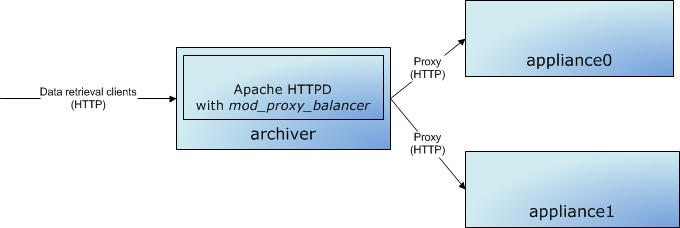
Note there are also other load-balancing solutions available that load-balance the HTTP protocol that may be more appropriate for your installation.
Also, note that Apache+Tomcat can also use a binary protocol called
AJPfor load-balancing between Apache and Tomcat. For this software, we should use simple HTTP; this workflow does not entail the additional complexity of theAJPprotocol.
Create your policies file
The EPICS archiver appliance ships with a sample
policies.py (from the tests site)
that creates a three stage storage environment. These are
STS - A datastore that uses the PlainStoragePlugin to store data in a folder specified by the environment variable
ARCHAPPL_SHORT_TERM_FOLDERat the granularity of an hour.MTS - A datastore that uses the PlainStoragePlugin to store data in a folder specified by the environment variable
ARCHAPPL_MEDIUM_TERM_FOLDERat the granularity of a day.LTS - A datastore that uses the PlainStoragePlugin to store data in a folder specified by the environment variable
ARCHAPPL_LONG_TERM_FOLDERat the granularity of an year.
If you are using the generic build and would like to point to a
different policies.py file, you can use the ARCHAPPL_POLICIES
environment variable, like so.
export ARCHAPPL_POLICIES=/nfs/epics/archiver/production_policies.py
On the other hand, if you are using a site specific build, you can
bundle your site-specific policies.py as part of the mgmt WAR during
the site specific build. Just add your policies.py to the source code
repository under src/sitespecific/YOUR_SITE/classpathfiles and build
the war by setting the ARCHAPPL_SITEID during the build using
something like export ARCHAPPL_SITEID=YOUR_SITE. In this case, you do
not need to specify the ARCHAPPL_POLICIES environment variable.
Installing Tomcat and setting up Apache Commons Daemon
Installing Tomcat consists of
Untar’ing the Tomcat distribution. It is best to set the environment variable
TOMCAT_HOMEto the location where the Tomcat distribution is expanded. Many of the following steps require aTOMCAT_HOMEto be set.Editing the
conf/server.xmlfile to change the ports to better suit your installation.By default, the connector port for the HTTP connector is set to 8080. Change this to the port used by the
mgmtwebapp for this appliance, in this example, 17665.<Connector connectionTimeout="20000" port="808017665" protocol="HTTP/1.1" redirectPort="8443"/>
Remove/comment out the sections for the AJP connector.
At the end, there should be two ports active in the
conf/server.xmlfile, one for the HTTP connector and the other for theSHUTDOWNcommand.
Setting the appropriate log4j configuration level by creating/editing the
lib/log4j2.xml. Here’s a sample that logs exceptions and errors with one exception - log messages logged to theconfignamespace are logged at INFO level.<Configuration> <Appenders> <Console name="STDOUT" target="SYSTEM_OUT"> <PatternLayout pattern="%d %-5p [%t] %C{2} (%F:%L) - %m%n"/> </Console> </Appenders> <Loggers> <Logger name="org.apache.log4j.xml" level="info"/> <Root level="info"> <AppenderRef ref="STDOUT"/> </Root> </Loggers> </Configuration>
To use Apache Commons Daemon, unzip the
${TOMCAT_HOME}/bin/commons-daemon-native.tar.gzand follow the instructions. Once you have built this, copy thejsvcbinary to the Tomcatbinfolder for convenience. Note, it’s not required that you useApache Commons Daemonespecially, if you are already using system monitoring and management tools like Nagios or Hyperic.$ tar zxf commons-daemon-native.tar.gz $ cd commons-daemon-1.1.0-native-src $ cd unix/ $ ./configure *** Current host *** checking build system type... x86_64-pc-linux-gnu ... $ make (cd native; make all) ... $ cp jsvc ../../../bin/
Installing MySQL
The version of MySQL that is available from your distribution is
acceptable; though this is completely untuned. Please look at the more
than excellent chapters on MySQL optimization at the MySQL web site to
tune your MySQL instance. In addition to various parameters, even
something as simple as setting innodb_flush_log_at_trx_commit=0
(assuming you are ok with this) will go a long way in improving
performace (especially when importing channel archiver configuration
files etc). Each appliance has its own installation of MySQL. In each
appliance,
Make sure MySQL is set to start on powerup (using
chkconfig)Create a schema for the archiver appliance called
archappland grant a user (in this example, also calledarchappl) permissions for this schema.CREATE DATABASE archappl; GRANT ALL ON archappl.* TO 'archappl'@localhost IDENTIFIED BY '<password>';
The archiver appliance ships with DDL, for MySQL, this is a file called
archappl_mysql.sqlthat is included as part of themgmtWAR file. Execute this script in you newly created schema. Confirm that the tables have been created using aSHOW TABLEScommand. There should be at least these tablesPVTypeInfo- This table stores the archiving parameters for the PVsPVAliases- This table stores EPICS alias mappingsExternalDataServers- This table stores information about external data servers.ArchivePVRequests- This table stores archive requests that are still pending.
Download and install the MySQL Connector/J jar file into your Tomcat’s
libfolder. In addition to the log4j2.xml file, you should have amysql-connector-java-XXX.jaras show here.$ ls -ltra ... -rw-r--r-- 1 mshankar cd 505 Nov 13 10:29 log4j2.xml -rw-r--r-- 1 mshankar cd 1007505 Nov 13 10:29 mysql-connector-java-5.1.47-bin.jar
Add a connection pool in Tomcat named
jdbc/archappl. You can use the Tomcat management UI or directly add an entry inconf/context.xmllike so<Resource name="jdbc/archappl" auth="Container" type="javax.sql.DataSource" factory="org.apache.tomcat.jdbc.pool.DataSourceFactory" username="archappl" password="XXXXXXX" testWhileIdle="true" testOnBorrow="true" testOnReturn="false" validationQuery="SELECT 1" validationInterval="30000" timeBetweenEvictionRunsMillis="30000" maxActive="10" minIdle="2" maxWait="10000" initialSize="2" removeAbandonedTimeout="60" removeAbandoned="true" logAbandoned="true" minEvictableIdleTimeMillis="30000" jmxEnabled="true" driverClassName="com.mysql.jdbc.Driver" url="jdbc:mysql://localhost:3306/archappl" />
Of course, please do make changes appropriate to your installation. The only parameter that is fixed is the name of the pool and this needs to be
jdbc/archappl. All other parameters are left to your discretion.Note for Debian/Ubuntu users: The Tomcat packages shipped with Debian/Ubuntu do not include the Tomcat JDBC Connection Pool. Download it from the web and drop the
tomcat-jdbc.jarfile into/usr/share/tomcat7/lib.
Setting up storage
This is specific to the needs of your policies.py. However, if you are
using the default policies.py that ships with the box or a variant
thereof, you’ll need to set up three stages of storage. A useful way to
do this is to create a folder called /arch and then create soft links
in this folder to the actual physical location. For example,
$ ls -ltra
total 32
lrwxrwxrwx    1 archappl archappl      8 Jun 21  2013 sts -> /dev/shm
lrwxrwxrwx    1 archappl archappl      4 Jun 21  2013 mts -> data
lrwxrwxrwx    1 archappl archappl     40 Feb 12  2014 lts -> /nfs/site/archappl/archappl01
drwxr-xr-x  195 archappl archappl    4096 Oct 15 15:05 data
We then set environment variables in the startup script that point to
the locations within /arch. For example,
    export ARCHAPPL_SHORT_TERM_FOLDER=/arch/sts/ArchiverStore
    export ARCHAPPL_MEDIUM_TERM_FOLDER=/arch/mts/ArchiverStore
    export ARCHAPPL_LONG_TERM_FOLDER=/arch/lts/ArchiverStore
Create individual Tomcat containers for each of the web apps
The mgmt.war file contains a script deployMultipleTomcats.py in the
install folder that will use the information in the appliances.xml
file and the identity of this appliance to generate individual Tomcat
containers from a single Tomcat install (identified by the environment
variable TOMCAT_HOME). To run this script, set the following
environment variables
TOMCAT_HOME- This is the Tomcat installation that you prepared in the previous steps.ARCHAPPL_APPLIANCES- This points to theappliances.xmlthat you created in the previous steps.ARCHAPPL_MYIDENTITY- This is the identity of the current appliance, for exampleappliance0. If this is not set, the system will default to using the machine’s hostname as determined by making a call toInetAddress.getLocalHost().getCanonicalHostName(). However, this makesARCHAPPL_MYIDENTITYa physical entity and not a logical entity; so, if you can, use a logical name for this entry. Note, this must match theidentityelement of this appliance as it is defined in theappliances.xml.
and then run the deployMultipleTomcats.py script passing in one
argument that identifies the parent folder of the individual Tomcat
containers.
$ export TOMCAT_HOME=/arch/single_machine_install/tomcats/apache-tomcat-9.0.20
$ export ARCHAPPL_APPLIANCES=/arch/single_machine_install/sample_appliances.xml
$ export ARCHAPPL_MYIDENTITY=appliance0
$ ./install_scripts/deployMultipleTomcats.py /arch/single_machine_install/tomcats
Using
    tomcat installation at /arch/single_machine_install/tomcats/apache-tomcat-9.0.20
    to generate deployments for appliance appliance0
    using configuration info from /arch/single_machine_install/sample_appliances.xml
    into folder /arch/single_machine_install/tomcats
The start/stop port is the standard Tomcat start/stop port. Changing it to something else random - 16000
The stop/start ports for the new instance will being at  16001
Generating tomcat folder for  mgmt  in location /arch/single_machine_install/tomcats/mgmt
Commenting connector with protocol  AJP/1.3 . If you do need this connector, you should un-comment this.
Generating tomcat folder for  engine  in location /arch/single_machine_install/tomcats/engine
Commenting connector with protocol  AJP/1.3 . If you do need this connector, you should un-comment this.
Generating tomcat folder for  etl  in location /arch/single_machine_install/tomcats/etl
Commenting connector with protocol  AJP/1.3 . If you do need this connector, you should un-comment this.
Generating tomcat folder for  retrieval  in location /arch/single_machine_install/tomcats/retrieval
Commenting connector with protocol  AJP/1.3 . If you do need this connector, you should un-comment this.
$
This is the last of the steps that are install specific; that is, you’ll execute these only on installation of a new appliance. The remaining steps are those that will be executed on deployment of new release, start/stop etc.
Deploy the WAR files onto their respective containers
Deploying/upgrading a WAR file in a Tomcat container is very easy. Each
container has a webapps folder; all we have to do is to copy the
(newer) WAR into this folder and Tomcat (should) will expand the WAR
file and deploy the WAR file on startup. The deployment/upgrade steps
are
Stop all four Tomcat containers.
Remove the older WAR file and expanded WAR file from the
webappsfolder (if present).Copy the newer WAR file into the
webappsfolder.Optionally expand the WAR file after copying it over to the
webappsfolderThis lets you replace individual files in the expanded WAR file (for example, images, policies etc) giving you one more way to do site specific deployments.
Start all four Tomcat containers.
If DEPLOY_DIR is the parent folder of the individual Tomcat containers
and WARSRC_DIR is the location where the WAR files are present, then
the deploy steps (steps 2 and 3 in the list above) look something like
pushd ${DEPLOY_DIR}/mgmt/webapps && rm -rf mgmt*; cp ${WARSRC_DIR}/mgmt.war .; mkdir mgmt; cd mgmt; jar xf ../mgmt.war; popd;
pushd ${DEPLOY_DIR}/engine/webapps && rm -rf engine*; cp ${WARSRC_DIR}/engine.war .; mkdir engine; cd engine; jar xf ../engine.war; popd;
pushd ${DEPLOY_DIR}/etl/webapps && rm -rf etl*; cp ${WARSRC_DIR}/etl.war .; mkdir etl; cd etl; jar xf ../etl.war; popd;
pushd ${DEPLOY_DIR}/retrieval/webapps && rm -rf retrieval*; cp ${WARSRC_DIR}/retrieval.war .; mkdir retrieval; cd retrieval; jar xf ../retrieval.war; popd;
Stopping and starting the individual Tomcats
Running multiple Tomcats on a single machine using the same install requires two enviromnent variables
CATALINA_HOME- This is the install folder for Tomcat that is common to all Tomcat instances; in our case this is$TOMCAT_HOMECATALINA_BASE- This is the deploy folder for Tomcat that is specific to each Tomcat instance; in our case this is${DEPLOY_DIR}/mgmt${DEPLOY_DIR}/etl${DEPLOY_DIR}/engine${DEPLOY_DIR}/retrieval
If you are using Apache Commons Daemon, then two bash functions for stopping and starting Tomcat instance look something like
function startTomcatAtLocation() {
    if [ -z "$1" ]; then echo "startTomcatAtLocation called without any arguments"; exit 1; fi
    export CATALINA_HOME=${TOMCAT_HOME}
    export CATALINA_BASE=$1
    echo "Starting tomcat at location ${CATALINA_BASE}"
    pushd ${CATALINA_BASE}/logs
    ${CATALINA_HOME}/bin/jsvc \
        -server \
        -cp ${CATALINA_HOME}/bin/bootstrap.jar:${CATALINA_HOME}/bin/tomcat-juli.jar \
        ${JAVA_OPTS} \
        -Dcatalina.base=${CATALINA_BASE} \
        -Dcatalina.home=${CATALINA_HOME} \
        -cwd ${CATALINA_BASE}/logs \
        -outfile ${CATALINA_BASE}/logs/catalina.out \
        -errfile ${CATALINA_BASE}/logs/catalina.err \
        -pidfile ${CATALINA_BASE}/pid \
        org.apache.catalina.startup.Bootstrap start
        popd
}

function stopTomcatAtLocation() {
    if [ -z "$1" ]; then echo "stopTomcatAtLocation called without any arguments"; exit 1; fi
    export CATALINA_HOME=${TOMCAT_HOME}
    export CATALINA_BASE=$1
    echo "Stopping tomcat at location ${CATALINA_BASE}"
    pushd ${CATALINA_BASE}/logs
    ${CATALINA_HOME}/bin/jsvc \
        -server \
        -cp ${CATALINA_HOME}/bin/bootstrap.jar:${CATALINA_HOME}/bin/tomcat-juli.jar \
        ${JAVA_OPTS} \
        -Dcatalina.base=${CATALINA_BASE} \
        -Dcatalina.home=${CATALINA_HOME} \
        -cwd ${CATALINA_BASE}/logs \
        -outfile ${CATALINA_BASE}/logs/catalina.out \
        -errfile ${CATALINA_BASE}/logs/catalina.err \
        -pidfile ${CATALINA_BASE}/pid \
        -stop \
        org.apache.catalina.startup.Bootstrap
        popd
}
and you’d invoke these using something like
    stopTomcatAtLocation ${DEPLOY_DIR}/engine
    stopTomcatAtLocation ${DEPLOY_DIR}/retrieval
    stopTomcatAtLocation ${DEPLOY_DIR}/etl
    stopTomcatAtLocation ${DEPLOY_DIR}/mgmt
and
    startTomcatAtLocation ${DEPLOY_DIR}/mgmt
    startTomcatAtLocation ${DEPLOY_DIR}/engine
    startTomcatAtLocation ${DEPLOY_DIR}/etl
    startTomcatAtLocation ${DEPLOY_DIR}/retrieval
Remember to set all the appropriate environment variables from the previous steps
JAVA_HOMETOMCAT_HOMEARCHAPPL_APPLIANCESARCHAPPL_MYIDENTITYARCHAPPL_SHORT_TERM_FOLDERor equivalentARCHAPPL_MEDIUM_TERM_FOLDERor equivalentARCHAPPL_LONG_TERM_FOLDERor equivalentJAVA_OPTS- This is the environment variable typically used by Tomcat to pass arguments to the VM. You can pass in appropriate arguments like soexport JAVA_OPTS="-XX:+UseG1GC -Xmx4G -Xms4G -ea"
LD_LIBRARY_PATH- If you are using JCA, please make sure your LD_LIBRARY_PATH includes the paths to the JCA and EPICS base.so’s.
A sample startup script using these elements is available here. Please modify to suit your installation.
Other containers
It is possible to deploy the 4 WAR files of the archiver appliance on other servlet containers or to use other industry standard provisioning software to provision an appliance. The details outlined here are guidelines on how to provision an appliance using Tomcat as a servlet container. If you generate scripts for industry standard provisioning software and are willing to share them, please add them to the repositorty and contact the collaboration; we’ll be happy to modify these documents to accomodate the same.